 Clew
Clew Reading mode
Math and theorems
Clew's mathematics is LaTeX mathematics. Inline and display math are
written with the delimiters every mathematical writer already knows,
rendered by a locally bundled MathJax that works entirely offline; on
top of that, the jmarkdown engine adds what a note-taking app almost
never has — numbered equations you can cross-reference from prose, and
a full family of theorem environments with shared, stable numbering.
The same source exports to LaTeX and PDF, where the engine's
amsmath and amsthm machinery takes over
natively.
Inline and display math
Inline math goes between single dollar signs (or, equivalently,
\(…\)):
You write
Euler's identity, $e^{i\pi} + 1 = 0$, connects five constants.
Display math stands on its own line, between double dollars or
\[…\]:
You write
$$
\int_0^\infty e^{-x^2}\,dx = \frac{\sqrt{\pi}}{2}
$$
Everything between math delimiters is handed to MathJax verbatim —
subscripts, commands, matrices, the lot — so anything you would write
in a LaTeX document works here. Display blocks written with
$$…$$ and \[…\] are unnumbered; numbered
equations are the engine's own construct, described next.
A bare AMS environment also works as a display block, without any dollar-sign wrapper at all:
You write
\begin{align}
f(x) &= x^2 - 1 \\
     &= (x-1)(x+1)
\end{align}
The engine recognizes a \begin{…}…\end{…} block at the
start of a line, protects its contents from all Markdown processing,
and passes it through for MathJax to typeset — nested environments
such as a pmatrix inside an align are handled
correctly. MathJax is configured with AMS numbering
(tags: 'ams'), so environments that number their lines do,
and MathJax-level \label/\eqref resolve
between math blocks on the same page. For references you make from
prose, though, use the engine's own equation environment
below — those resolve at build time and survive LaTeX export.
Numbered equations
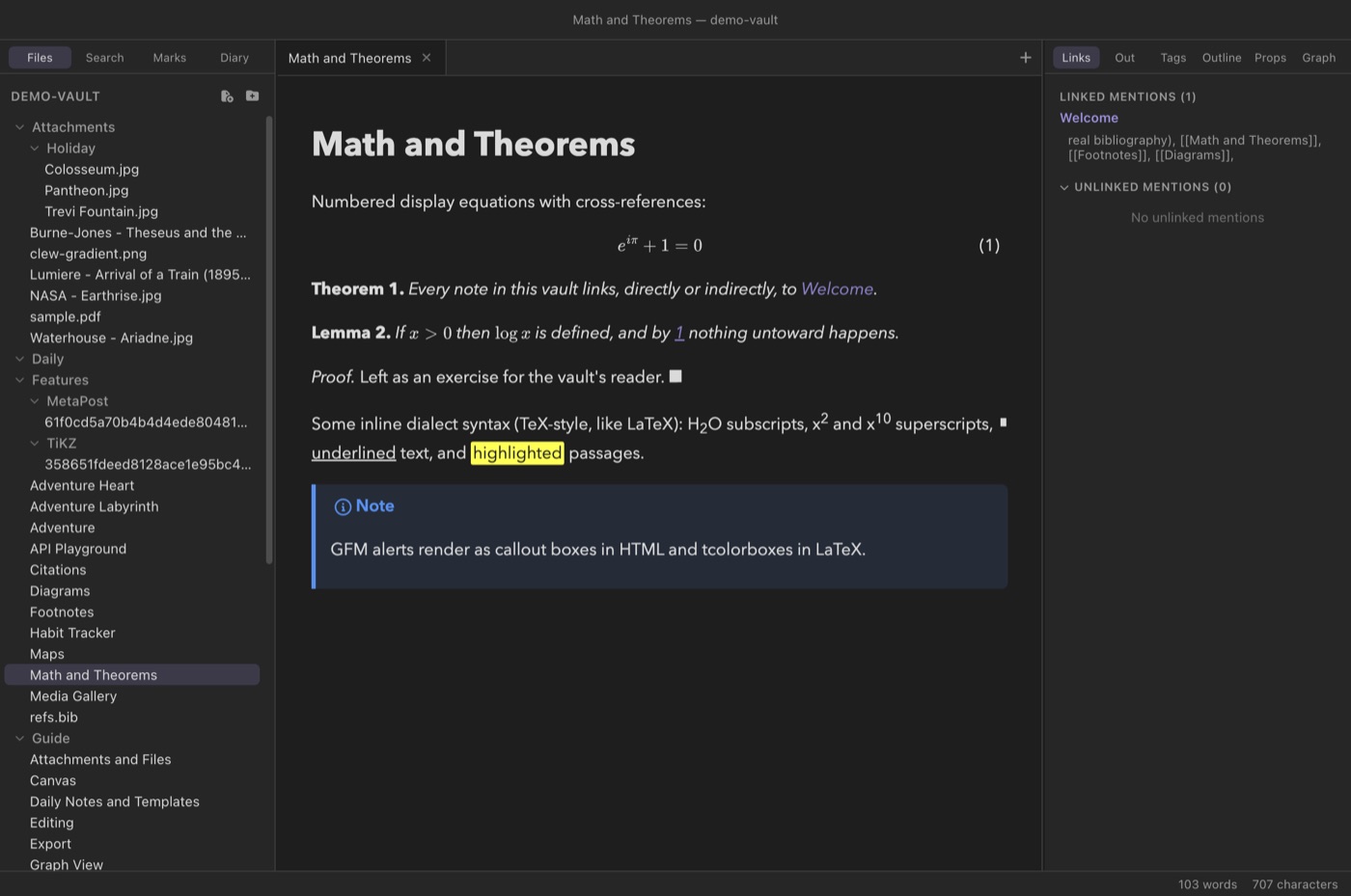
To number an equation and refer to it later, use the
@begin(equation) environment:
You write
@begin(equation){#eq-euler}
e^{i\pi} + 1 = 0
@end(equation)

As @ref[eq-euler] shows, the five constants are not strangers.
The body is raw mathematics — no $$ delimiters; the
environment supplies them — and the engine itself assigns the number,
counting @begin(equation) blocks in document order and
placing (1), (2), … beside each. Because the
numbering is done by the engine at build time rather than by MathJax in
the browser, a reference like @ref[eq-euler] resolves to a
hyperlinked number exactly the way figure and section references do,
and the HTML and LaTeX outputs agree on every number.
The {#eq-euler} attaches the label. Two spellings are
accepted: the shorthand {#name}, and the explicit
{id=name} — use the explicit form when your label
contains a colon ({id=eq:euler}), which the shorthand
cannot carry.
Cross-references
Three reference forms work anywhere in prose, for equations and theorems alike (and for figures, tables, and sections, which have labels of their own):
@ref[key]- The bare number, as a hyperlink to the target — LaTeX's
\ref. An equation's is bare too ("2"); write the parentheses yourself, or use@cref. @cref[key]- A typed reference: the kind word plus the number — "equation (1)",
"theorem 2", "lemma 3" — LaTeX's cleveref
\cref. The engine knows what kind of thing each label marks, so you never write the word yourself and it can never disagree with the target. @Cref[key]- The same, capitalized for the start of a sentence: "Equation (1)", "Theorem 2".
A reference to a label that does not exist renders as
?? — the same mark LaTeX uses — so a broken reference is
visible in the output rather than silently wrong. In LaTeX export
these forms become native \ref and \cref, so
the print document resolves them with the real machinery.
@ref[…] and :ref[…] are the same directive in
two spellings — jmarkdown accepts both, and the same goes for
cref, Cref, and label. This
manual writes the @ forms throughout, matching the demo
vault.
What gets a number
- Equations from
@begin(equation)—$$…$$and\[…\]are never numbered. - Theorems — theorem, lemma, corollary, proposition, definition, example, remark — share one counter: Theorem 1, Lemma 2, Corollary 3. A proof is unnumbered.
- Figures (subfigures 1a, 1b), tables and listings each count on their own.
- Headings, only when the note's header says
Headings: numeric: every heading, the title included, 1., 1.1., 1.2. A reference to one says "section" or "subsection" by its depth. - A target takes its key from
{#key}or{id=key}on its opening line ({id=eq:mass}when the key has a colon, which the#form cannot carry), or from an@label[key]inside it. An@labelin a heading takes the heading's number; anywhere else — a footnote included, for now — it has none, and a reference to it prints??.
While you write
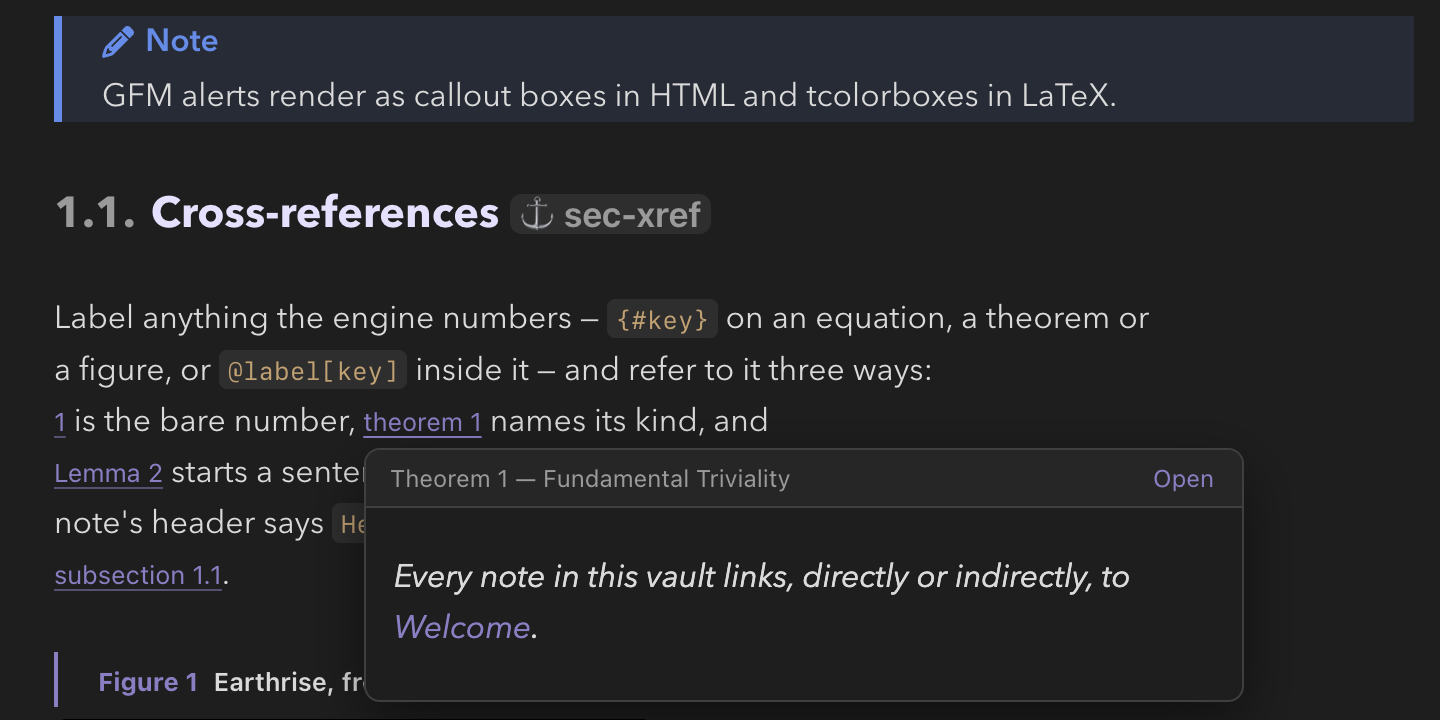
In live edit, every @ref, @cref and
@Cref shows the number the rendered note will print, a
numbered environment's heading says "Theorem 2" or "Figure 1", an
@begin(equation) carries its "(n)", and numbered headings their
"1.2.". Click a reference to jump to what it names (⌘[ comes
back); ⌥-click edits it; hover it to preview the target. A
reference to a key this note does not define shows ?? in red,
as the engine prints it. Typing @ref[ (or @cref[,
@Cref[) lists the note's labels with their numbers, and the
palette's Jump to label… lists them to go to.
jmarkdownProject option) is
numbered as a whole by its export, and a reference to a label in another
note shows ?? while you write.
An environment a plugin defines as
numbered is counted only when the plugin's manifest declares it; any
other environment with a label shows ? — Clew will not guess
what the export will print.
Theorem environments
The engine provides seven theorem-like environments plus
proof. Each is written as a block environment:
You write
@begin(theorem)[Pythagoras]{id=thm:pyth}
For a right triangle, $a^2 + b^2 = c^2$.
@end(theorem)

@begin(lemma)
If $x > 0$ then $\log x$ is defined.
@end(lemma)

@begin(proof)
By rearrangement. $\blacksquare$
@end(proof)
The optional bracket after the opener — [Pythagoras] — is
the environment's name, rendered in parentheses after the number
exactly as amsthm does: "Theorem 1 (Pythagoras)."
The optional {id=…} attaches a cross-reference label, so
@cref[thm:pyth] elsewhere produces "theorem 1".
The full set of kinds, and how each presents its body:
- theorem, lemma, corollary, proposition — the classical "plain" style: the body is italicized.
- definition, example — definition style: an upright body, since definitions read badly in italics.
- remark — remark style, also upright.
- proof — unnumbered, labelled "Proof.", closed with a QED mark.
How numbering works
All seven numbered kinds share one sequential counter:
if a theorem is followed by a lemma and then a definition, they are
Theorem 1, Lemma 2, Definition 3. This is a deliberate
choice, and the classical one for mathematical writing — with per-kind
counters, "does Lemma 1 come before or after Theorem 2?" is a
puzzle a reader has to solve on every reference; with a shared counter,
the numbers alone give the document order. A typed reference still
names each kind correctly: @cref to a lemma says
"lemma 2", never "theorem 2".
The body of a theorem is ordinary jmarkdown, so wikilinks, citations, math, and even footnotes work inside it — the demo vault's Dialect Demo note puts an inline footnote inside a theorem to make the point.
MathJax under the hood
Clew ships MathJax with the app and loads it from local files — there
is no CDN request, and mathematics renders identically with no network
connection at all. The configuration accepts the four delimiter pairs
described above ($…$, \(…\),
$$…$$, \[…\]) with the AMS extension
enabled, and output is SVG, so rendered math is crisp at any zoom.
When you edit a note, the re-rendered preview patches in place and math
is re-typeset without the page flashing back to raw TeX (see
How rendering works).
Math in export
Because the source is already LaTeX mathematics, export is not a
translation. In HTML export the same MathJax pipeline runs; in LaTeX
and PDF export the delimiters pass straight through to the real
engine, @begin(equation) becomes an
amsmath equation environment, and each
theorem kind is declared with amsthm/thmtools
sharing the theorem counter, with cleveref resolving the typed
references. The numbers in your PDF match the numbers in your preview
because both sides count the same blocks in the same order. See
Exporting notes.
Practical advice
The jmarkdown dialect and TeX use some of the same characters, and it pays to keep the boundary straight:
- In prose, the dialect gives you TeX-style
sub- and superscripts directly:
H_2O,x^2,x^{10}render as H2O, x2, x10 with no math mode required. Reach for$…$when you need actual mathematics — symbols, operators, spacing — rather than a lone sub- or superscript. - Inside
$…$, you are in TeX, and the dialect's remappings do not apply:*,/,_, and^all mean what they mean in LaTeX. Write$x_1^2$without a second thought. - Inside code spans and fences, nothing is interpreted at all — the place to show math source without rendering it.
- The body of
@begin(equation)is taken verbatim, so underscores, carets, and backslashes survive untouched; you never need to escape for the Markdown layer inside it.
_ and ^ are live in prose, an
unintended subscript is the most common dialect surprise: a variable
name like my_var in running text will render "var" as a
subscript. Put identifiers in code spans (`my_var`) —
which is better typography anyway — or switch the vault to standard
Markdown syntax if your notes are code-heavy
(see the dialect chapter).
The same goes for money: two amounts in one paragraph —
$5 and $10 — are a pair of delimiters, and everything
between them becomes a formula. Escape them, \$5, or
put them in code spans.
$…$ and $$…$$ with its own
MathJax, so plain inline and display math round-trips between the two
apps. The engine-level constructs — @begin(equation),
the theorem environments, @ref/@cref — are
jmarkdown features: in Obsidian those lines appear as the literal text
you typed. Nothing breaks; the notes remain plain Markdown files.
Reference
| Construct | Syntax | Notes |
|---|---|---|
| Inline math | $…$ or \(…\) | TeX inside; unnumbered |
| Display math | $$…$$ or \[…\] | Unnumbered display block |
| Bare AMS environment | \begin{align} … \end{align} | No wrapper needed; contents protected verbatim |
| Numbered equation | @begin(equation){#key} … @end(equation) | Engine-numbered; body is raw math |
| Theorem-like environment | @begin(theorem)[Name]{id=key} … @end(theorem) | Kinds: theorem, lemma, corollary, proposition, definition, example, remark |
| Proof | @begin(proof) … @end(proof) | Unnumbered; QED mark |
| Label | {#key} or {id=key} | Use id= when the key contains a colon |
| Reference (number) | @ref[key] | Hyperlinked number; ?? if unresolved |
| Typed reference | @cref[key] / @Cref[key] | "theorem 2" / "Theorem 2"; cleveref in LaTeX |
See also
- How rendering works — the render pipeline that typesets all of this, and how it updates as you type.
- The jmarkdown dialect — the prose-side sub/superscripts and the standard-Markdown switch.
- Citations and bibliographies — the other pillar of academic writing in Clew.
- Exporting notes — the LaTeX and PDF side of the same source.