Clew

A thread through your notes.

An open-source, Obsidian-style note app whose reading mode is a real typesetting engine. Plain-text vaults, wikilinks, and canvases that Obsidian can still open — with LaTeX math, citations, diagrams, interactive maps, and a programmable core that Obsidian can't match.

GPL-3.0-or-later macOS · Windows · Linux iPad & iPhone in development Obsidian-compatible vaults No accounts, no cloud, no lock-in
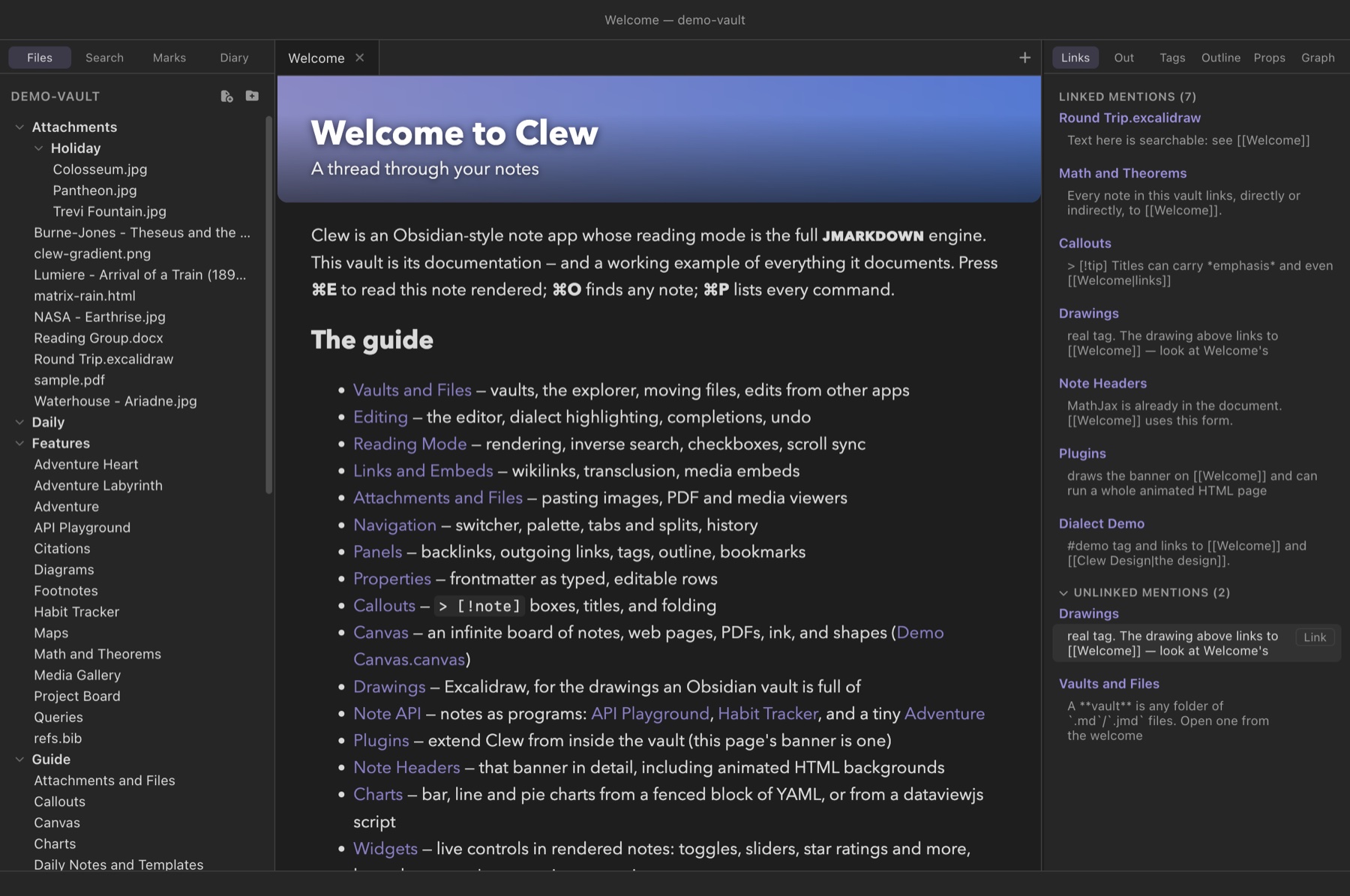
Clew's Welcome note in reading mode, with a banner header rendered by a vault plugin

Reading mode is a typesetting engine

Clew renders notes with jmarkdown, an engine built for academic writing: the same source file compiles to HTML in the app and to LaTeX/PDF for print. Not a preview approximation — the real thing.

Math, theorems, citations, diagrams

  • LaTeX math via MathJax — inline, display, AMS numbering and cross-references
  • Theorem environments — theorem, lemma, proof, numbered and referenceable
  • Citations from BibTeX — \cite{lewis1969} with real bibliography styles, and cite-key autocompletion in the editor
  • Diagrams — mermaid fences; TikZ, MetaPost, LaTeX and plain TeX typeset in the page by a WebAssembly TeX, with nothing to install
  • Footnotes, alerts, tables, tags, GitHub-style callouts

Export any note to HTML, LaTeX, or PDF from the File menu — same source, print-grade output.

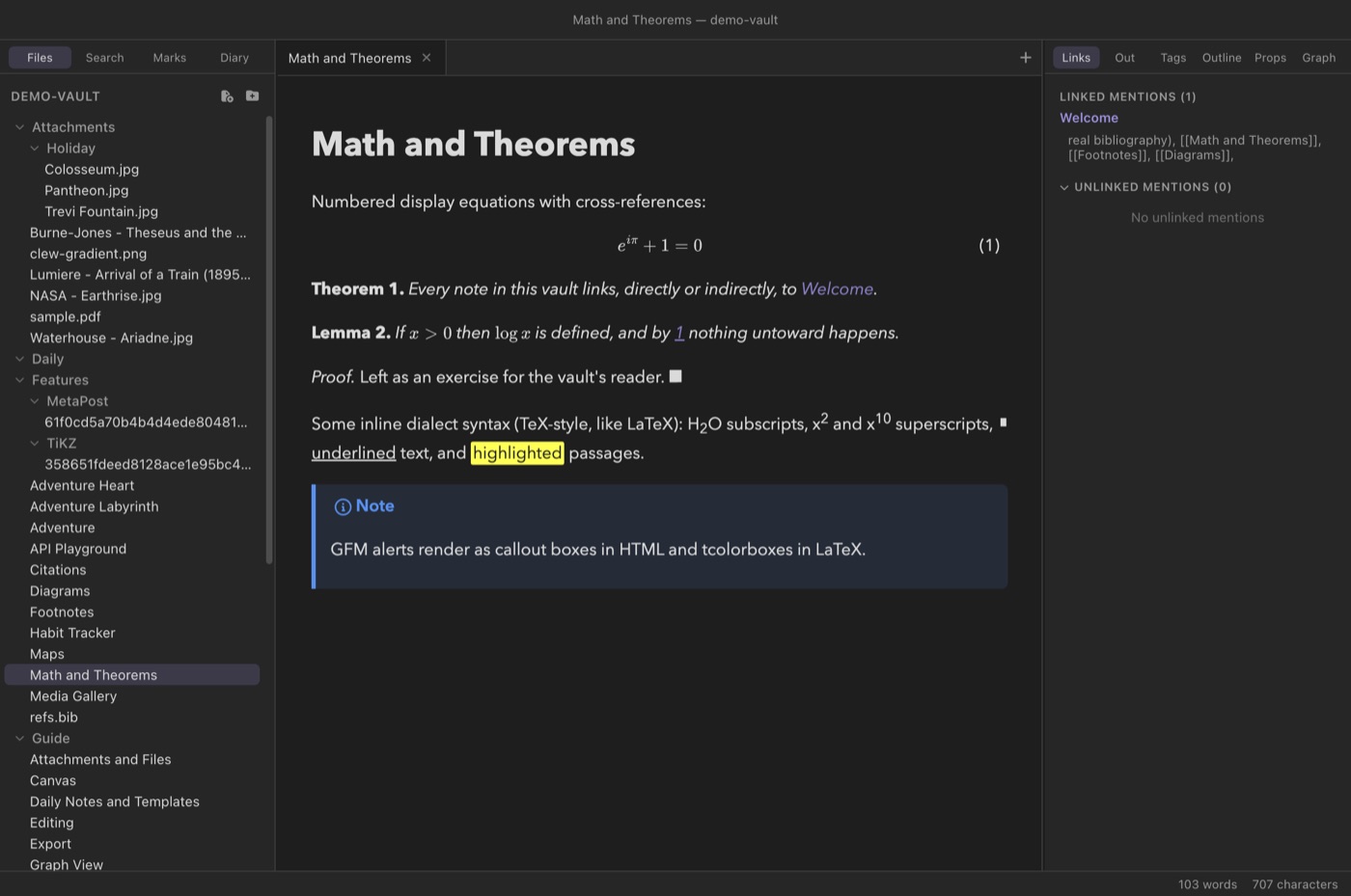
A note with numbered display equations, theorem and lemma environments, and a callout box

A dialect worth learning — or turning off

The jmarkdown dialect gives dedicated syntax to the things academics actually write: /italics/, *strong*, ==highlights==, TeX-style sub/superscripts, inline footnotes, alignment blocks.

Prefer standard Markdown? One per-vault switch reverts the inline syntax to ordinary *em*/**strong** — and because jmarkdown is a superset of Markdown, any existing vault renders as its author intended, plus everything above.

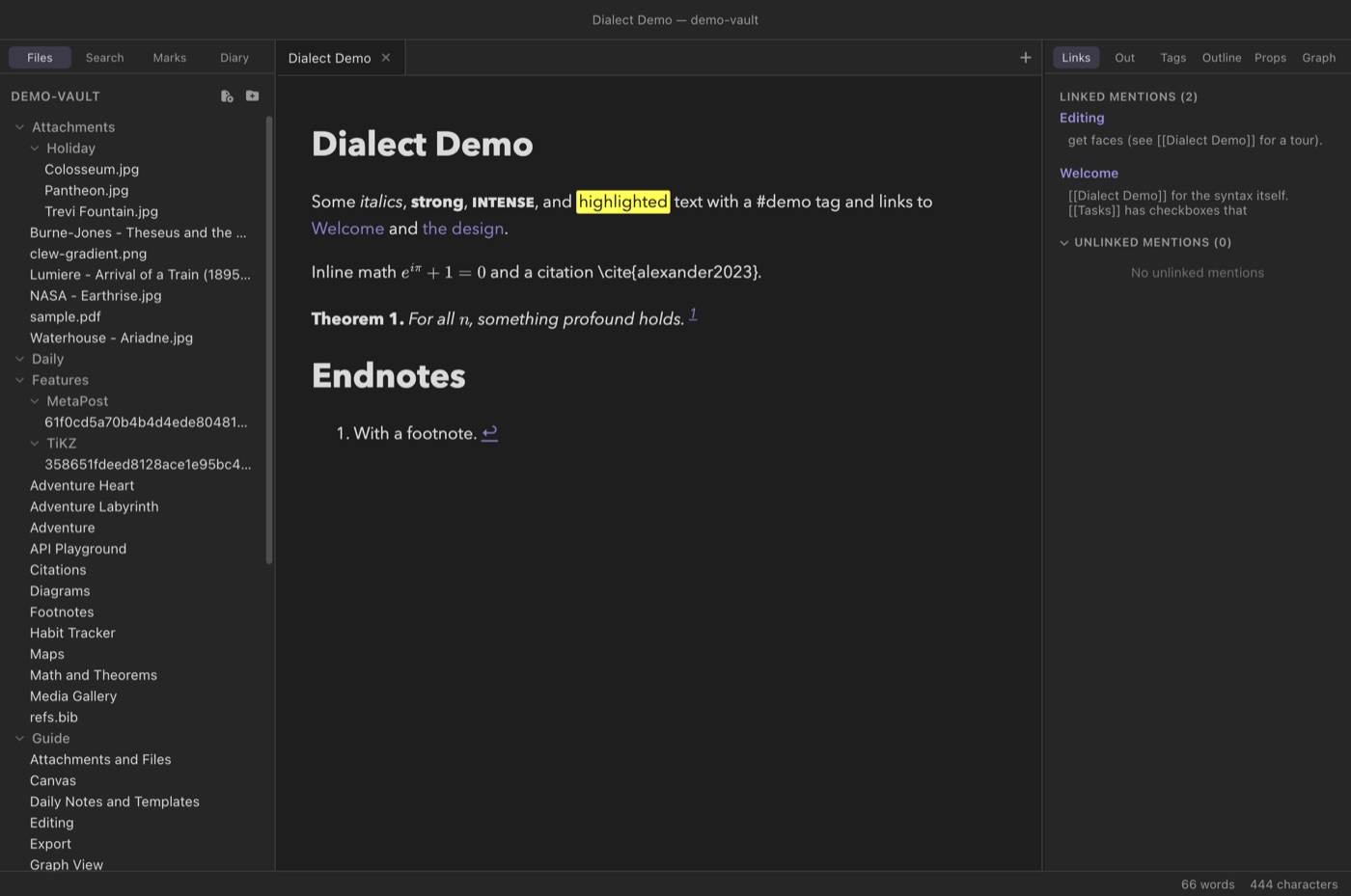
The dialect demo note rendered: italics, strong, highlights, math, a citation, and a theorem

A canvas that draws

An infinite board for notes, files, web pages, and thought — with the drawing tools Obsidian's canvas never got.

Excalidraw looks, flowchart brains

  • Ink and shapes with three sloppiness levels, dashed/dotted strokes, hachure fills, opacity, and standalone text in four typefaces
  • Flowchart node styles — pill, diamond, parallelogram, predefined process — plus edge routing (curved, straight, square), arrowheads both ways, z-order control
  • Live note embeds — actual rendered notes on the canvas, math and all; web pages; PDFs; media
  • Portals — drop a canvas onto a canvas and see a live miniature
  • PNG export of the drawing layer, and live read-only canvas embeds inside notes

Files are standard JSON Canvas — Obsidian opens them; Clew's extras ride in a key other apps ignore.

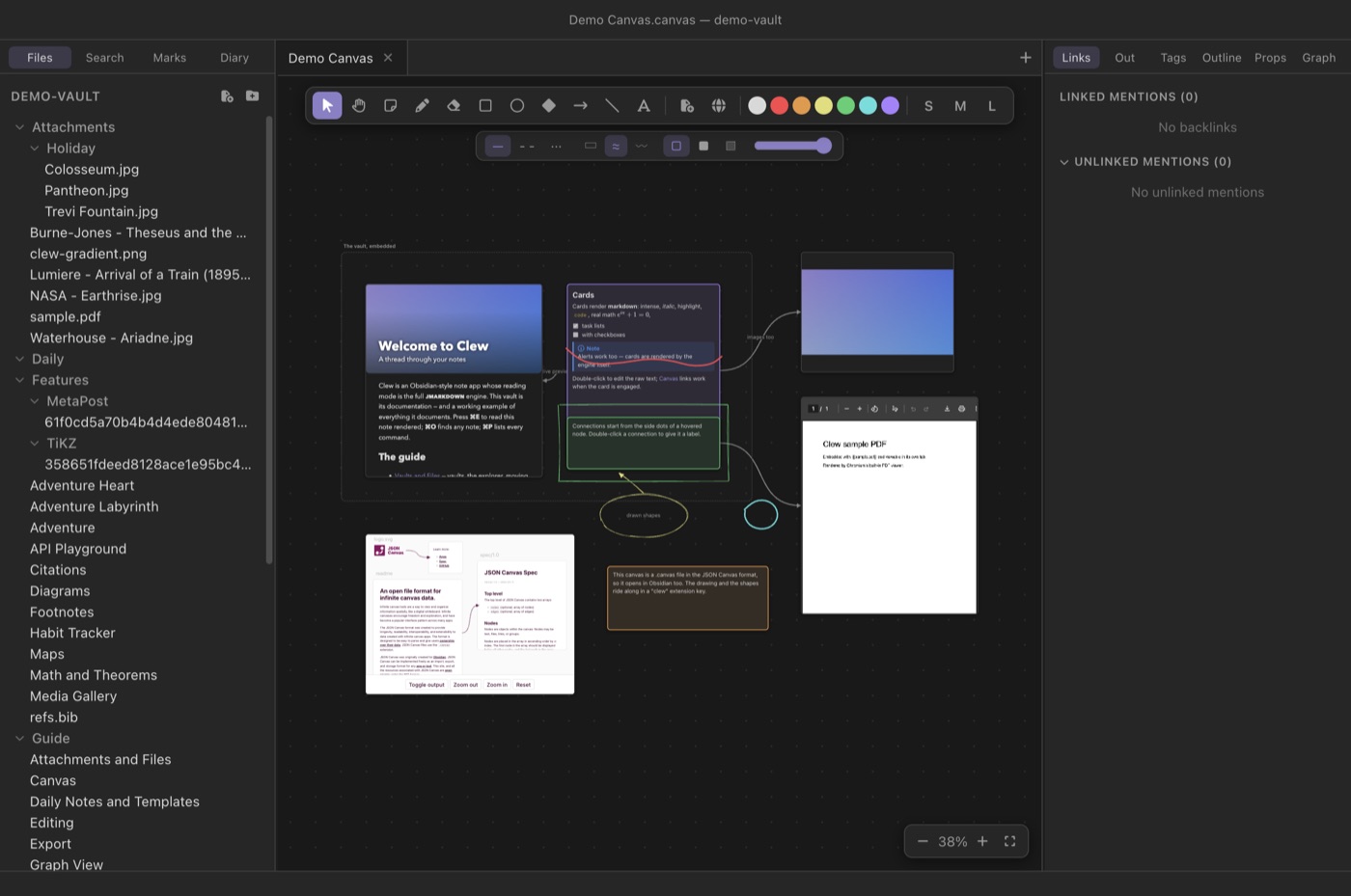
The demo canvas: an embedded live note, cards, an image, a PDF, connections, and hand-drawn ink and shapes

Maps, memory, and territory

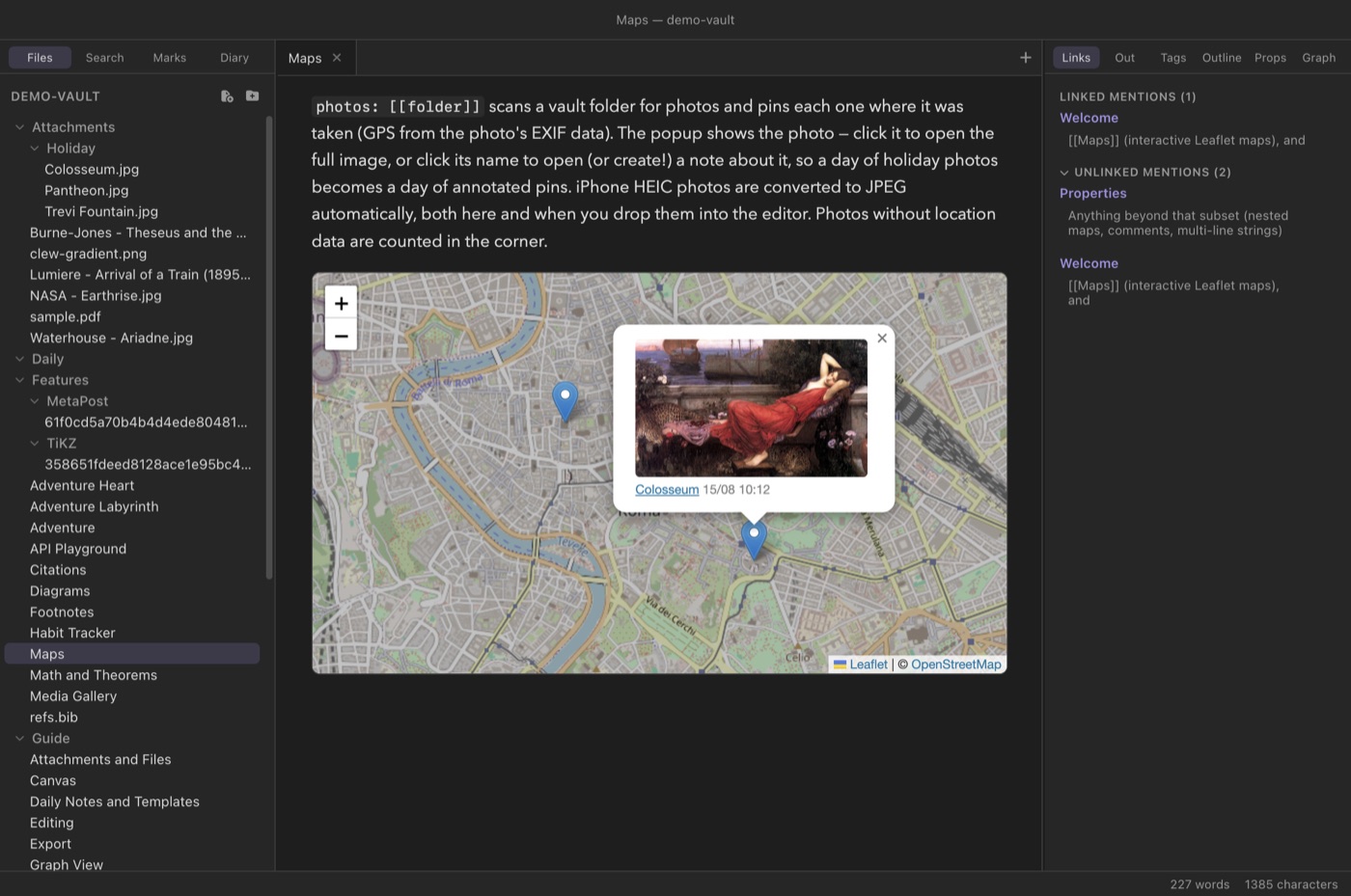
A ```leaflet fence renders an interactive map — most of the beloved Obsidian Leaflet plugin's surface, built in.

Pins, tracks, and a day of photos

  • Markers with popups and wikilinks; markers gathered from note frontmatter across files, folders, or tags
  • GeoJSON regions, GPX tracks, circle overlays, distance measuring
  • Six tile styles (the default is CARTO's Google-Maps-like Voyager) or any custom tile server; offline image-based maps for floor plans and fantasy worlds
  • Photo maps: point photos: at a vault folder and every geotagged photo becomes a pin — thumbnail popup, capture time, and a link that opens or creates a note about it. iPhone HEIC converts to JPEG automatically.
A photo map of Rome with an open popup showing a photo thumbnail, its name, and capture time

The vault is a database — a writable one

Notes carry state: a paper's status, a book's rating, an essay's grade. Clew's queries surface it — and, unlike anything in the Obsidian world, write it back.

Queries you can type into

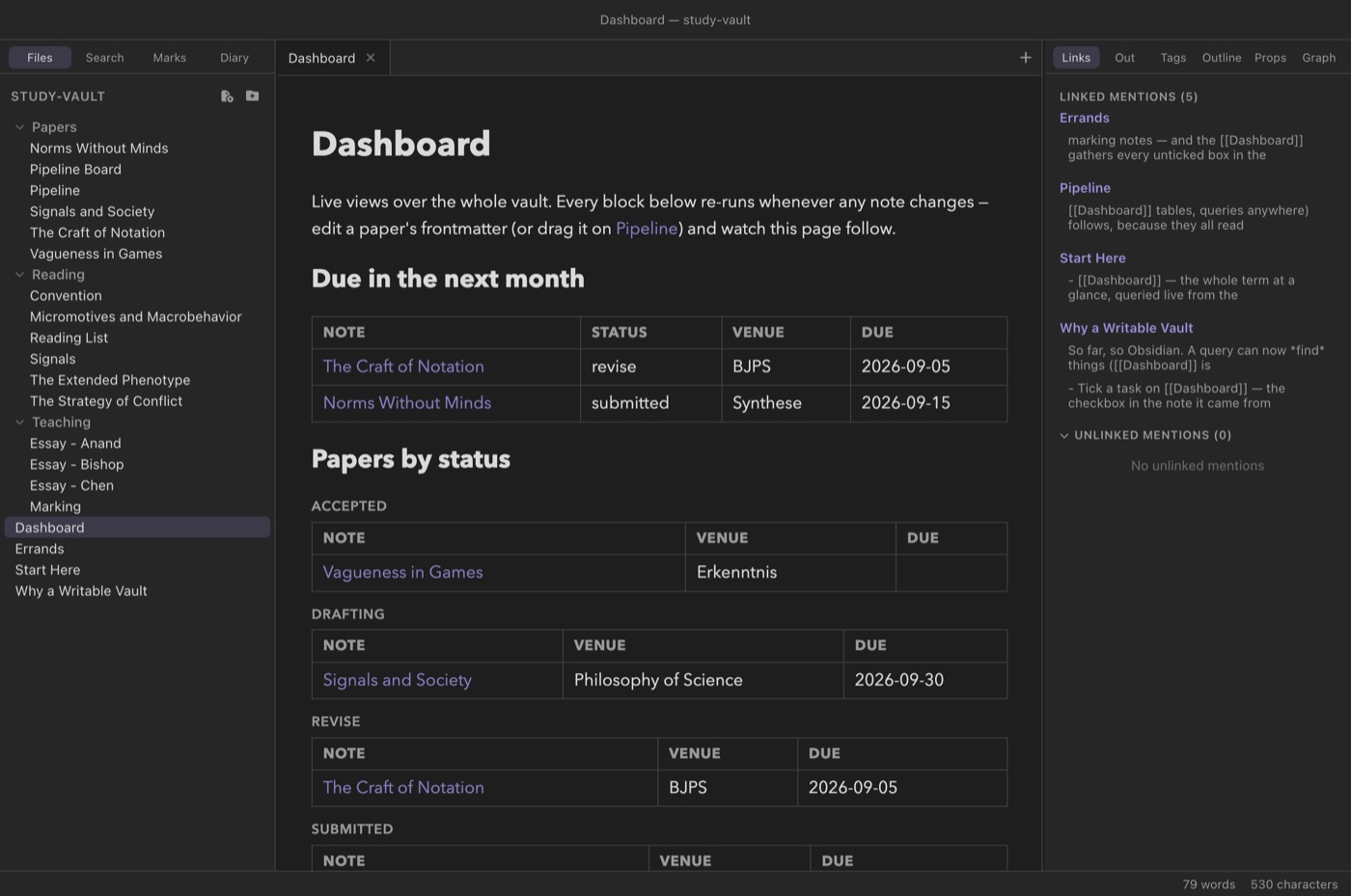
  • A ```query fence filters notes by folder, tag, and frontmatter — with date arithmetic (due < today + 31d), grouping, sorting
  • Table cells are editable: click, retype, Enter — the value lands in that note's own frontmatter
  • Dataview-style inline fields (Rating:: 8) read and write the same way
  • ```tasks gathers every checkbox in the vault; ticking one writes back to its source note
  • Open dashboards re-render whenever any note changes
A live dashboard: a due-soon table with date arithmetic and papers grouped by status

Kanban that rewrites frontmatter

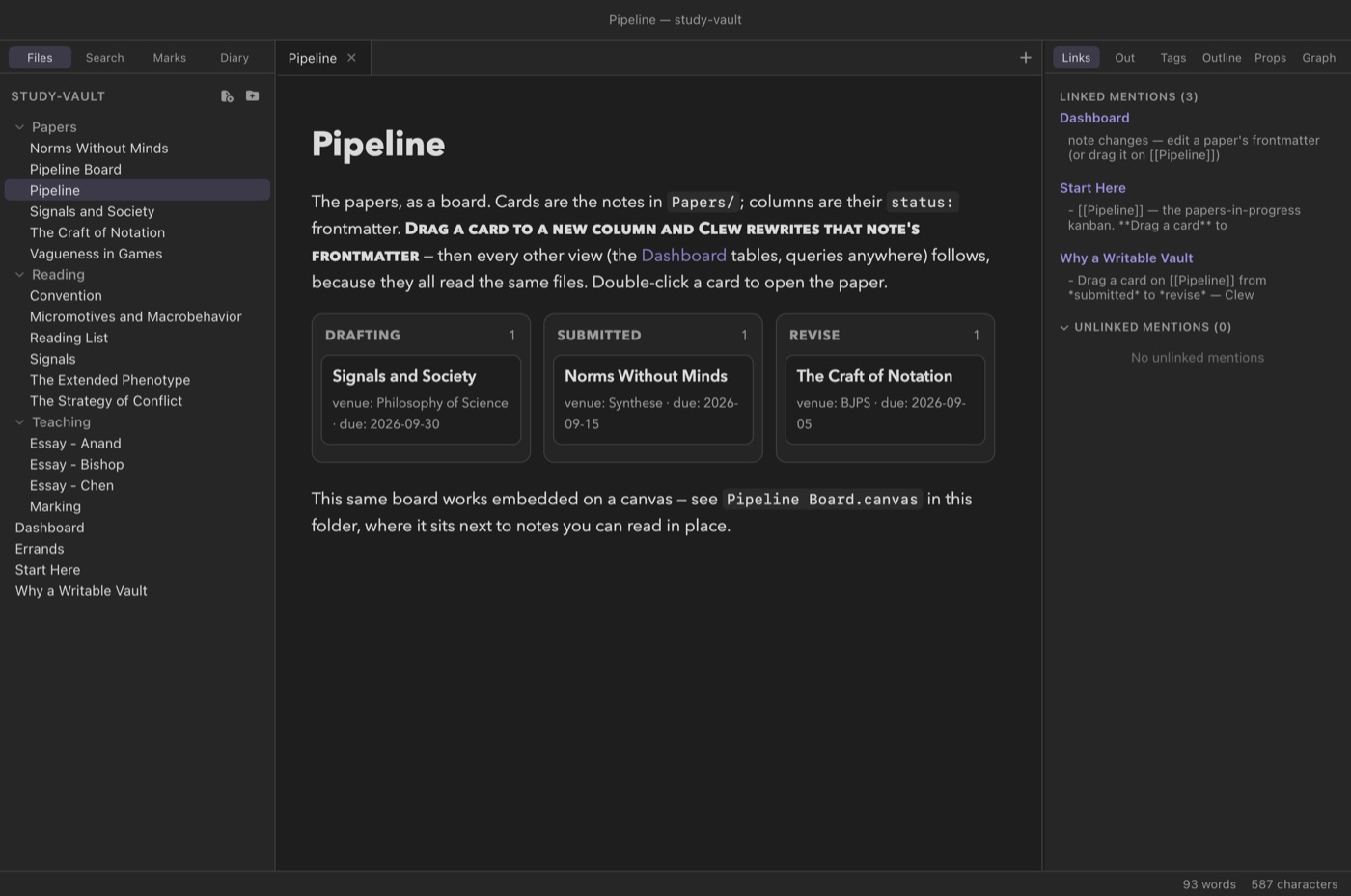
A ```kanban fence projects notes as a board — columns are the values of a frontmatter field. Drag a card to another column and Clew rewrites that note's field; every query view follows, because they all read the same files. Works embedded on the canvas, too.

There is no database file. Every row and every card is a plain Markdown note — greppable, git-able, yours. The repository ships a second demo vault (study-vault/) staged as an academic term run entirely on these features.

A kanban board of papers by status, with venue and due-date metadata on the cards

Publish the whole vault

File → Export → Vault as Website compiles every note to a static page: wikilinks become real relative links, math and diagrams render, maps keep their pins, dashboards bake to snapshots, your custom elements ship along. The result is a folder any web host can serve — Obsidian Publish without the subscription. (This very page's demo vault exports to 37 pages with zero failures.)

A diary with views

One log or many files — your choice

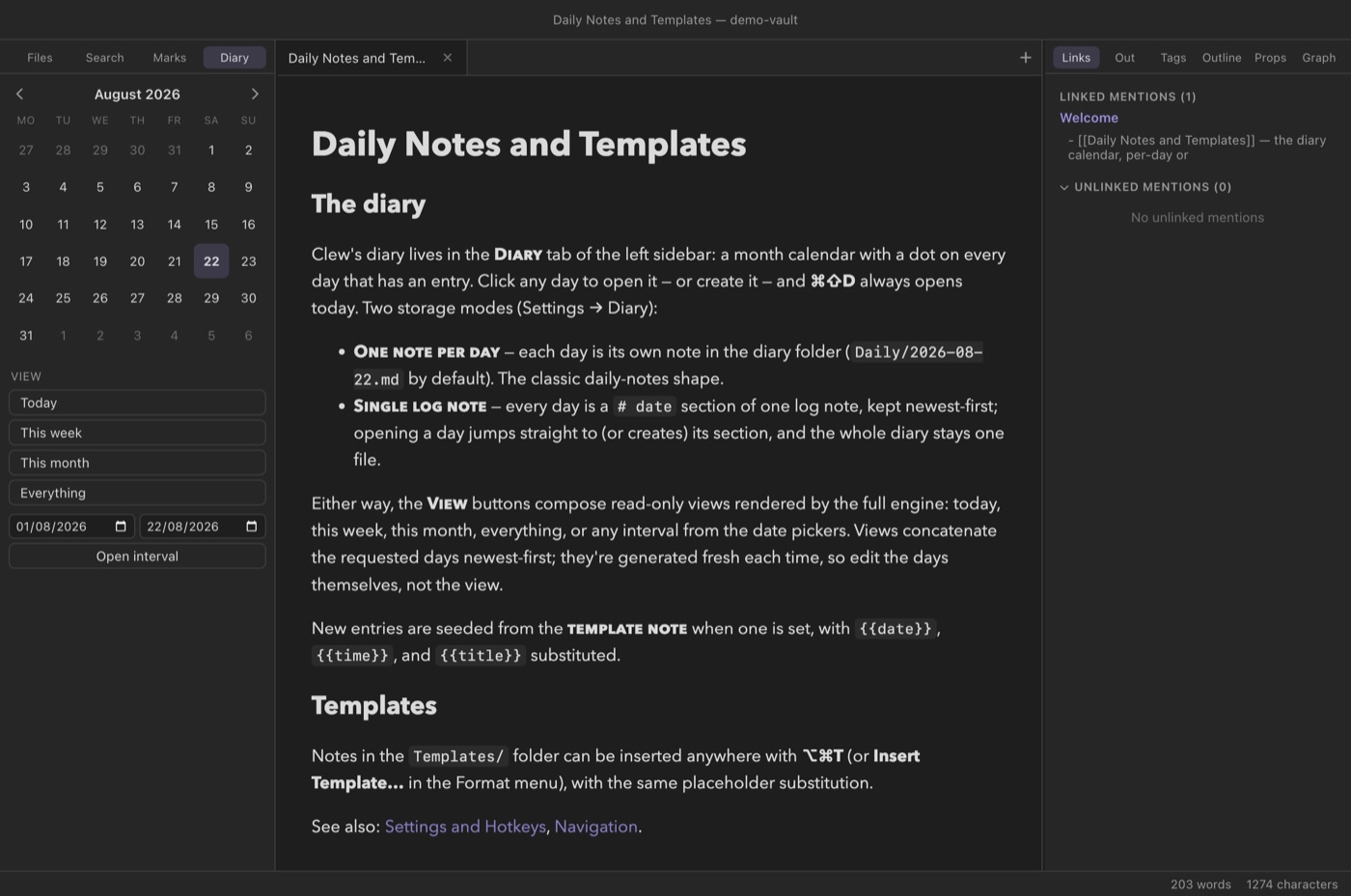
  • A calendar in the sidebar: dots mark days with entries, click any day to open or create it
  • Keep per-day files or one single log with dated sections
  • Composed views: today, this week, this month, any interval, or the whole diary — rendered as one continuous document
  • Daily-note templates with date substitution
The diary calendar panel beside a rendered note

And the whole vault as a graph

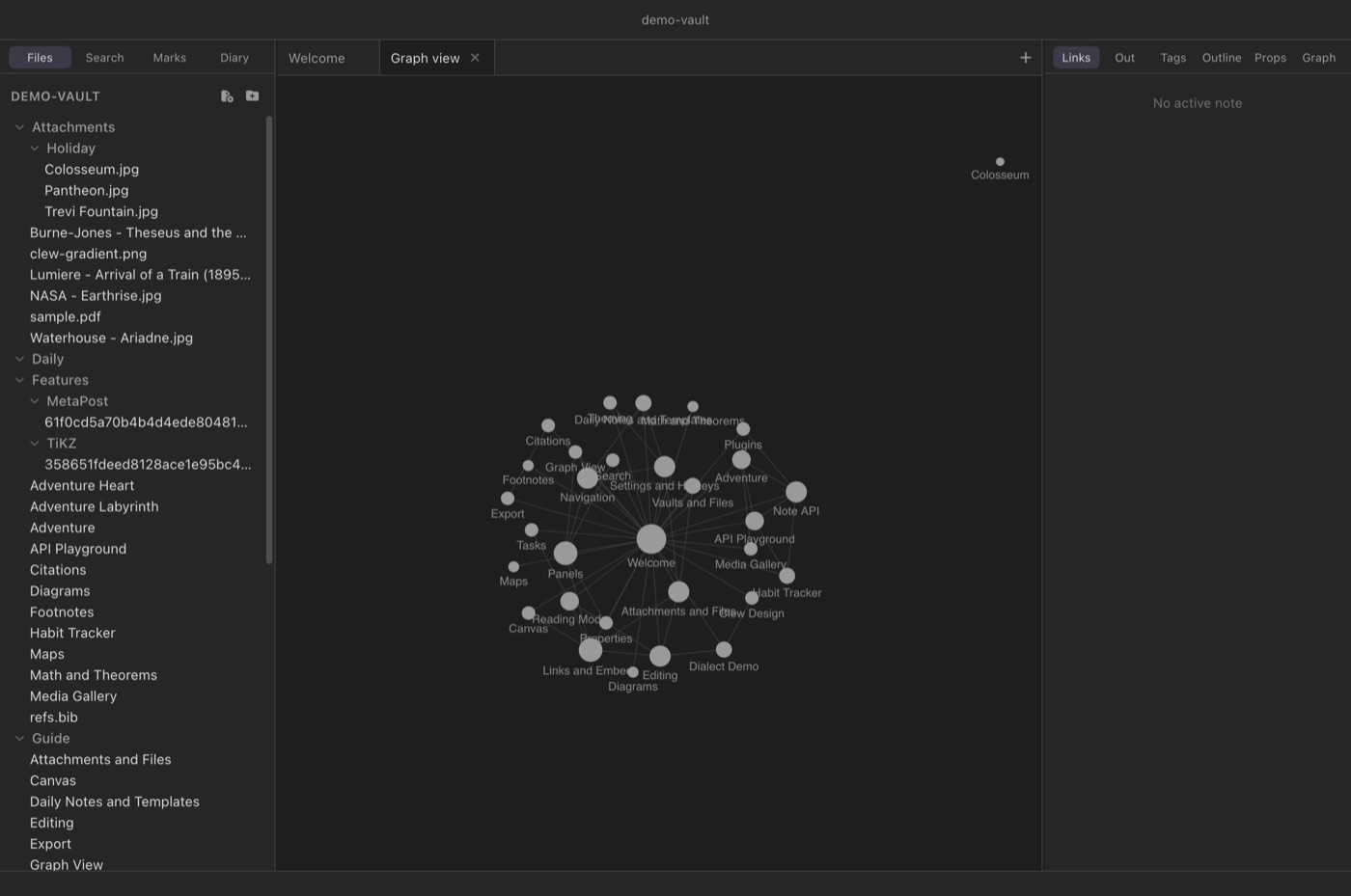
Backlinks, outgoing links, unlinked mentions, tags, an outline panel, full-text search — and a force-directed graph of the whole vault or the local neighborhood of the current note.

Symlinks are fully supported (cycle-safe), so vaults can weave in folders that live elsewhere — something Obsidian never allowed.

The vault graph view

Programmable to the bone

Two scripting stories, both traveling with the vault — because Clew is open source, extension isn't a business model, it's a folder.

The Note API

A <script> in a rendered note gets a window.clew API: open notes, search, read and write files and frontmatter, run commands, and share state in a clewdata.json that syncs with the vault. Notes become small apps — habit trackers, dashboards, even games.

Vault plugins

A folder under .clew/plugins/ extends Clew at three seams: engine (new syntax — fences, directives), preview (decorate rendered notes), and app (commands, vault IO, notices, against a small versioned API). Install one inside a vault or once for all of them; off until enabled, per vault.

clew.commands.register({
  id: 'count',
  name: 'Word count',
  run: async () => {
    const p = clew.workspace.activePath();
    const t = await clew.vault.read(p);
    clew.ui.notice(t.split(/\s+/).length + ' words');
  },
});

Everything else you'd expect

Command palette, editable hotkeys, native menus, tabs and splits with per-tab history, pinned tabs, multiple windows (one vault each), properties panel, bookmarks, attachment paste, vault-wide rename with link rewriting, dark and light themes, CSS snippets. Word, Excel and PowerPoint files edit in tabs — LibreOffice, in WebAssembly — and every note keeps a history you can browse and restore.

Your files stay yours

A vault is a folder of Markdown. Clew never touches .obsidian/, keeps [[wikilinks]] Obsidian-shaped, and stores its own state in a separate .clew/ folder — open the same vault in both apps, today. No accounts, no telemetry, no sync service required: it's your disk, your git, your call.

And now it runs on iPad

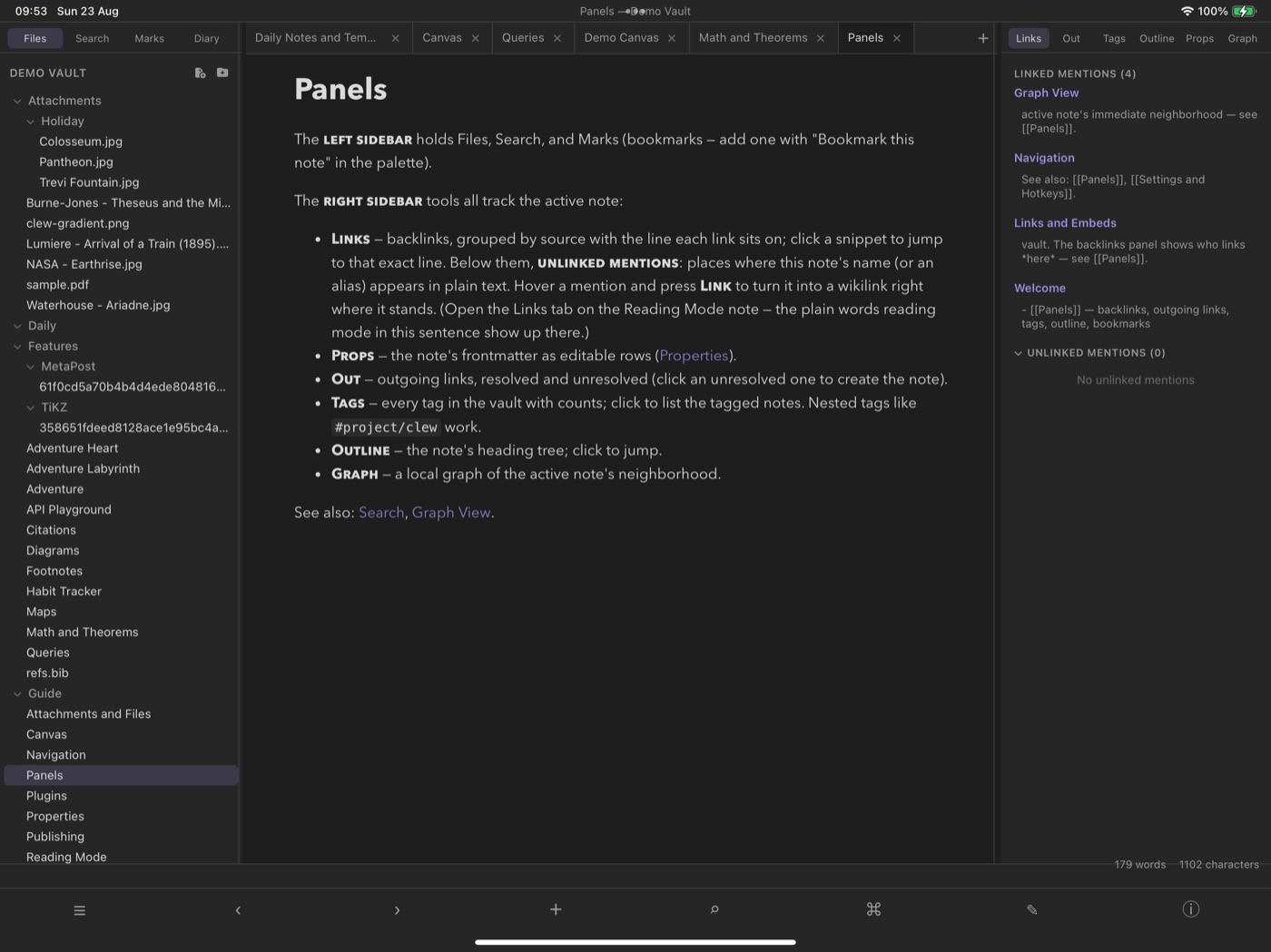
Clew for iOS is a real port, not a companion app. The entire desktop renderer — the same web components, the same CodeMirror 6 editor, some fourteen thousand lines of it — runs unmodified inside a WKWebView. The jmarkdown engine runs in a Web Worker over an in-memory filesystem, and Swift supplies what Electron's main process used to. The workspace you know comes with it: tabs, the file explorer, backlinks and unlinked mentions, queries, MathJax and theorems, mermaid, live canvas embeds.

Draw on the canvas with an Apple Pencil

Clew's canvas has always stored ink strokes as first-class data, in a JSON Canvas file Obsidian can still open. On iPad you now write those strokes with a Pencil, and pan and pinch-zoom the scene with two fingers — then open the same .canvas file on your Mac and find your handwriting waiting in it.

The touch layer is native where it needs to be: sidebars become overlay drawers on compact widths, long-press opens the context menus, and a toolbar carries the commands a menu bar used to. Vaults live in the Files app, so iCloud or any file provider can carry them.

Status: in beta on TestFlight. Clew for iPad runs on real hardware and is being tested through Apple's TestFlight. The diagrams cross with it: TikZ, MetaPost, LaTeX and plain TeX typeset on the iPad by the same WebAssembly engines, with nothing to install — and note history, foldable embeds, global plugins and the reading-view PDF export are all there. Two things stay desktop-only because they shell out to external toolchains: Mathematica blocks and the LaTeX/PDF export. To try the beta, ask for an invitation; a public TestFlight link will appear here when the open beta starts.

Clew running on an iPad: the file explorer, a tab strip, a note in reading mode, and the backlinks panel

Download

Version 0.9.0. Clew is free software — no account, no licence key, no telemetry. Pick your platform.

On the Windows and Linux builds: they are cross-compiled from macOS and have not been exercised on real machines by the author, so they are offered honestly as untested. The macOS build is signed with a Developer ID certificate and notarized by Apple, so it opens without a Gatekeeper warning. If you would rather trust nothing at all, every platform builds from source in three commands — see below.

Getting started

  1. Build from source (Node 20+):
    git clone <repository-url> clew && cd clew
    npm install
    npm run dev        # develop
    npm run package    # build the app for your platform
  2. Open a vault — any folder of Markdown files, including an existing Obsidian vault.
  3. Read the manual — every feature explained in depth, with examples and screenshots.
  4. Or read the guide in the app — the bundled demo-vault/ is Clew's documentation written in Clew: every guide note exercises the features it documents.
  5. Then try the worked example — study-vault/ is a second vault staged as an academic term, where the writable database earns its keep: drag a card across the kanban board and watch a dashboard query, a rating cell and a task list all follow the same edit.

Licence and credits

Clew is free software, released under the GNU General Public License, version 3 or later. You may use it for anything, study how it works, share it, and change it. The one condition is reciprocity: if you distribute Clew or a derivative, it travels under the same licence, with source.

Third-party components

Clew ships a lot of other people's good work, and every dependency it distributes has been checked for GPL-3.0 compatibility — 632 packages across the app and the bundled engine. They are MIT, ISC, BSD, Apache-2.0, MPL-2.0, Blue Oak and public-domain licensed, all of which combine freely with the GPL.

One deserves a specific note. Citation formatting uses citeproc-js, which its author offers under either the CPAL or the GNU Affero GPL, version 3 or later. Clew takes the AGPL option, which section 13 of the GPLv3 expressly permits combining with a GPLv3 work. (Some automated scanners report this package as AGPL-1.0 from its npm metadata; its actual licence file says version 3 or later.)

With thanks to

The full licence text ships with the app in LICENSE, and every source file carries its own notice. Clew stores no accounts, sends no telemetry, and talks to no server it was not explicitly pointed at.