 Clew
Clew Writing
Daily notes and the diary
A diary is the lowest-friction note there is: today already has a name, so there is nothing to decide before you start writing. Clew's diary is a calendar in the sidebar, a keystroke that always lands on today, and a choice of two honest storage shapes — one file per day, or one long log with a heading per day. On top of either shape it can compose read-only views of any stretch of time: today, this week, this month, or the entire diary rendered as a single continuous document.
The diary calendar
The diary lives in the Diary tab of the left sidebar: a month grid, Monday first, with a dot on every day that has an entry and today's date highlighted. The interactions are what you would guess:
- Click a day to open its entry — or to create it, if the day is blank. There is no separate “new entry” step; the diary treats opening and creating as the same gesture.
- The ‹ and › buttons step through months, and clicking the month name jumps back to the current month.
- ⌘⇧D opens today's entry from anywhere, whether or not the panel is showing. The same command sits in the Go menu as Today's Diary Entry, next to Diary Calendar, which opens the panel itself.
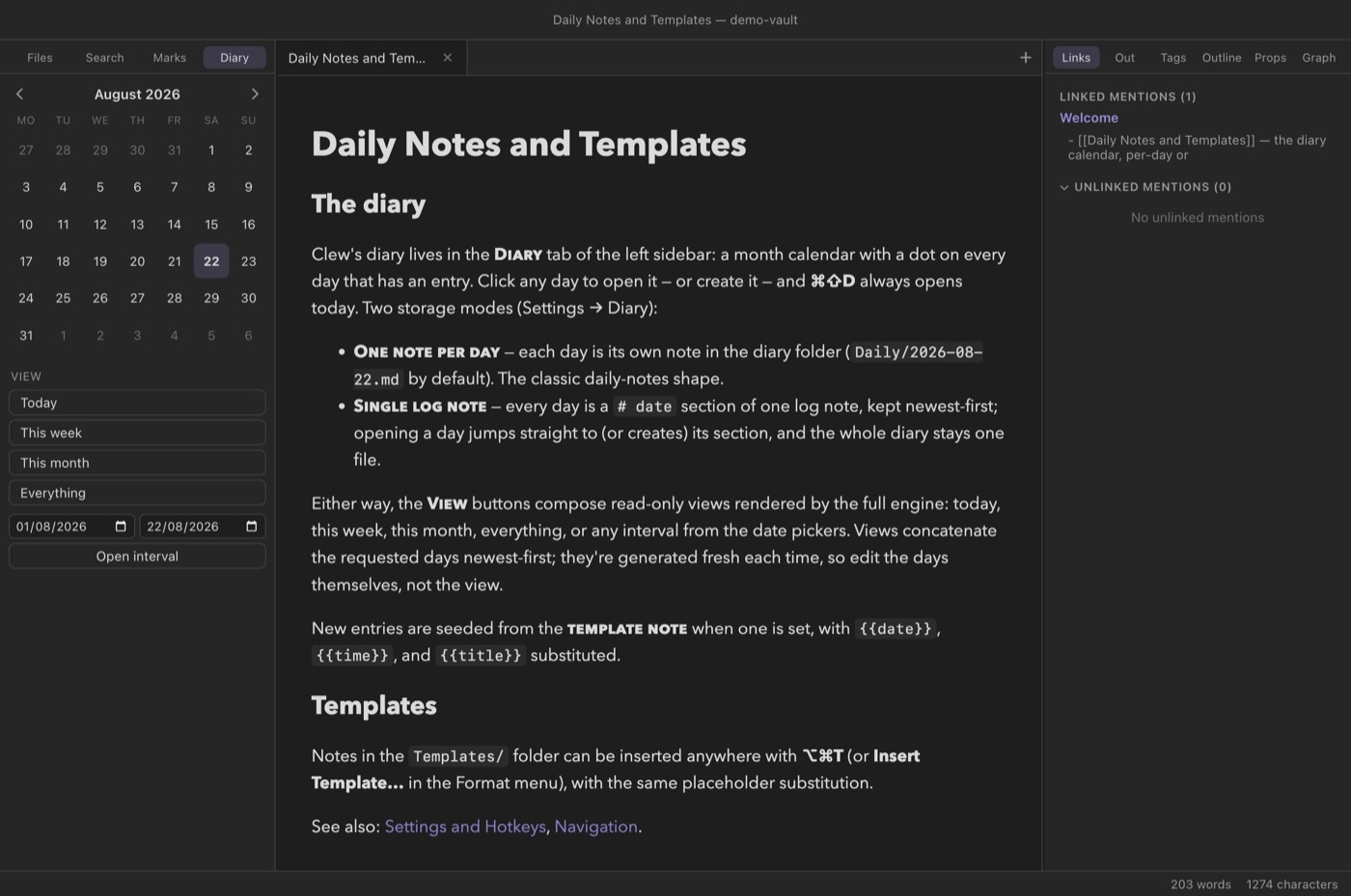
The dots track the vault live: create an entry by any route — the calendar, ⌘⇧D, or a file made by hand in the right folder with the right name — and the calendar picks it up.
Two ways to store a diary
Settings → Diary offers a Mode choice, and it is worth a moment's thought, because the two modes produce genuinely different vaults on disk. Both are plain Markdown; neither locks you in.
One note per day
The classic daily-notes shape: each day is its own file, named by the
date format, inside the diary folder. With the defaults (folder
Daily, format YYYY-MM-DD) a week of writing
looks like this on disk:
On disk
Daily/
  2026-08-18.md
  2026-08-19.md
  2026-08-21.md
  2026-08-22.md
Days you skipped are files that never got created — the diary has no
opinion about gaps. Per-day files suit a diary that accumulates
substance: each day can grow its own headings, attachments, and
backlinks, and each day is individually linkable as
[[2026-08-22]].
A single log note
In log mode the whole diary is one note (by default
Diary.md), and each day is a heading inside it, kept
newest first:
On disk (Diary.md)
# 2026-08-22

Reviewed the draft; the second section still sags.

# 2026-08-21

Long walk. Nothing written, everything composted.

# 2026-08-19

Started reading the Fleck book.
Clicking a day in the calendar jumps straight to its section, creating the heading at the right chronological position if it does not exist yet. Any level-1 or level-2 heading whose text parses as a date in your configured format counts as a day; other headings are ordinary content inside the day above them. When the log is already open in an editor, Clew inserts the new section through that editor, so the insertion is undoable and never fights your unsaved edits. A log suits a diary of short entries — a line or three a day — where the pleasure is scrolling back through time in one file.
YYYY, MM, and
DD — Clew needs to parse names back into dates to put
dots on the calendar and order log sections. Any arrangement and
separators work (DD.MM.YYYY, say), but in per-day mode
the formatted date becomes a file name, so avoid characters that are
not valid in file names, such as /.
Composed views: a week at a glance
Below the calendar sit the View buttons: Today, This week, This month, Everything, and Open interval with a pair of date pickers for any custom range. Each one gathers the requested days — files or log sections, whichever mode you are in — and composes them into a single document, newest first, which opens in a new tab in reading mode and is rendered by the full engine like any other note.
The composition is careful about structure: every day appears under a level-2 heading with its date, and any level-1 headings inside a daily note are demoted so the day headings remain the document's outline. The result reads as one continuous diary — this is the way to re-read a month, or to skim an entire year with Everything.
.clew/Diary View.md,
invisible to the file explorer and the index, and view tabs are
dropped when the app restarts.
Templates
A template is an ordinary note whose text seeds new content, with three placeholders substituted at insertion time:
| Placeholder | Becomes |
|---|---|
{{date}} | Today's date, as YYYY-MM-DD. |
{{date:FORMAT}} | Today's date in a custom format — YYYY, MM, DD, HH, mm tokens, e.g. {{date:DD.MM.YYYY}}. |
{{time}} | The current time, as HH:mm. |
{{time:FORMAT}} | The current time in a custom format. |
{{title}} | The note's title — the formatted date for a diary entry, the note's name when inserting into an existing note. |
Templates meet the diary through the Template note setting (Settings → Diary): name a note there and every newly created entry — a fresh per-day file, or a fresh section of the log — is seeded from it, placeholders substituted. A minimal daily template might be:
You write (the template note)
## {{date}} — plan

- [ ]

## Notes
Templates are not only for the diary. Insert Template…
(⌘⌥T, or Format → Insert → Template…)
lists every note in the Templates/ folder (the folder
name is a setting) and inserts the chosen one at the cursor, with the
same substitution — {{title}} becoming the current note's
name. The demo vault ships one worked example,
Templates/Meeting.md:
You write (Templates/Meeting.md)
---
tags: [meeting]
---
# {{title}} — {{date}}

Attendees:

## Notes
Create a note named after the meeting, press ⌘⌥T, choose Meeting, and the skeleton lands with the note's name and today's date already in the heading.
Templates/ gives you both behaviours from
one file: it seeds new diary entries automatically and
appears in the ⌘⌥T list for manual insertion elsewhere.
YYYY-MM-DD.md files — so an existing Obsidian daily-notes
folder works as a Clew diary as-is, and entries written in Clew show
up in Obsidian's daily notes. Clew never reads
.obsidian/ settings, so set Clew's diary folder and date
format to match what Obsidian uses. A single-log diary is plain
Markdown headings that Obsidian renders happily, though Obsidian's
own daily-notes machinery does not know about it. Composed views live
under .clew/ and are invisible to Obsidian.
Reference
The diary's settings (Settings → Diary, plus the templates folder under Files):
| Setting | Default | Meaning |
|---|---|---|
| Mode | One note per day | One note per day or Single log note. |
| Log note (log mode) | Diary.md | The log file's path, in log mode. |
| Folder (per-day mode) | Daily | Where per-day files live. |
| Date format | YYYY-MM-DD | Entry names and log headings; must contain YYYY, MM, and DD. |
| Template note (optional) | — | A note whose text seeds every new entry. |
| Templates folder | Templates | Where Insert Template… looks for templates. |
Commands (all rebindable in the hotkey editor):
| Command | Hotkey | Where |
|---|---|---|
| Open today's diary entry | ⌘⇧D | Go menu, command palette. |
| Open diary calendar | — | Go menu, command palette, sidebar Diary tab. |
| Insert template… | ⌘⌥T | Format → Insert menu, command palette; needs an open editor. |
See also
- The editor — where the writing itself happens.
- Panels — the sidebar the diary calendar lives in.
- Properties and metadata — frontmatter you might stamp into a daily template.
- Queries — gather tasks and fields from daily notes into live tables.
- Interactive maps — photo maps pair well with travel diaries.
- Settings and hotkeys — every setting above, and rebinding the shortcuts.